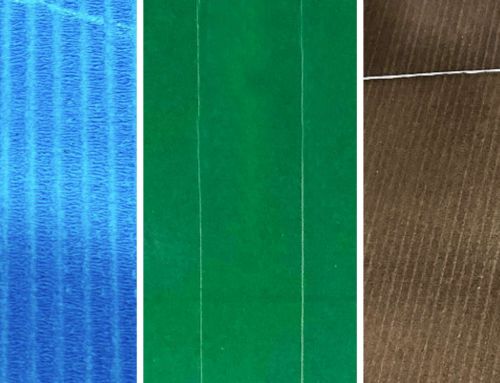
Experiencing unwanted lines on your flexographic prints?
Lines across your finished product can stem from various printing problems. Rapid identification of what is causing lines on your print and resolution are crucial to minimise print rejects and production delays for your business.
Our expertise tackles common causes of lines across your print:
- Flute Lines (Wash Boarding): Excessive pressure applied during printing often masks the underlying issue of contaminated anilox rollers. Increased pressure will result in lines across your print in the form of Flute Lines. Our cleaning solutions effectively remove contaminants, eliminating the need for excessive pressure and preventing flute lines.
- White Lines: “Water-only” wash-up cycles leave dried ink residue on metal doctor blades, which then contaminates the anilox roller. This dried ink buildup clogs the anilox cells, hindering ink transfer and causing white lines across the print. Water alone isn’t capable of removing dried in ink.
- It is essential that a cleaning solution that has been formulated for use on anilox rollers and for the type of inks you are using, is used to remove dried ink residue, safely and efficiently. Anilox rollers kept in top condition will ensure optimal ink transfer and high-quality print.
- Horizontal Lines: Leaving doctor blades in contact with the anilox roller at the end of a print run allows ink to dry, causing the blade to stick. This is something we too often see. This repeated action creates a permanent score line on the anilox, replicating itself as horizontal lines on the printed product. Our technical support and training, will illustrate best practice care and maintenance. Our training will explain proper cleaning procedures to prevent doctor blades from sticking and creating these print line defects.
- Score Lines: Dried ink can build up above and around the print unit. Particles can break loose and become trapped between the roller surface and the blade, resulting in a circumferential damage to the cells. This score line will transfer as a line across your print.

Card sample suffering from white lines

Card sample suffering from horizontal lines
All these print defects, which form lines across your print, can be eradicated or greatly reduced from happening if the correct care and maintenance process is put into place.
Regular (at least) daily cleaning of anilox rollers with the appropriate cleaning solutions should be undertaken. Regular inspections, by your skilled and experienced print operators is essential to pro-actively avoid and reduce damage to your anilox rollers, or core components, such as doctor blades. With managed maintenance print defects will be reduced.
Don’t let print defects disrupt your production!
We offer technical support to monitor and maintain your anilox rollers.
Print Tech Solutions offers comprehensive care and maintenance packages that not only ensure consistent high-quality print but also empower your print operators. With the correct training, your print operators will become better equipped in how to monitor the condition of anilox rollers and action to take to reduce and prevent print defects. Our comprehensive training programs will help to achieve these skills.
If you are suffering from print issues or would benefit from additional resources to support you maintain your anilox rollers in top condition, contact our team now.
T: 0161 366 6286 | E: info@print-techsolutions.co.uk | Contact Us